How to Keep Customer Data Safe When WhatsApp Bans Your Account
How to Keep Customer Data Safe When WhatsApp Bans Your Account
Let's cut to the chase: WhatsApp account bans are happening more frequently in 2026 than in previous years. Many cross-border sellers report that newly registered numbers especially get caught in the system's automated flagging when activity patterns look slightly off. But here's what actually separates successful operators from the rest—it's not who avoids bans entirely, but who can still reach their customers afterward. When you lose customer records, you're not just losing contact details; you're losing months or even years of built-up trust.
From my experience in this industry, most small studios and mid-sized sellers store customer data in phone contacts, Excel spreadsheets, or WhatsApp's built-in chat history. That's a risky setup. WhatsApp's ban system operates on a guilt-by-association model—unusual behavior on one device can trigger a ban across your entire account. And the chat export feature often drops attachments and images when backups are incomplete.
Pre-Ban Escape Routes: Hidden WhatsApp Features You Probably Didn't Know About
Many cross-border sellers don't realize WhatsApp actually offers an official chat export function, but it's buried deep in the menu. Open any conversation, tap "More options," then "Export chat," and you can choose whether to include media files. Here's the catch: the exported file is plain text format, so images and voice messages become attachment links you can't preview.
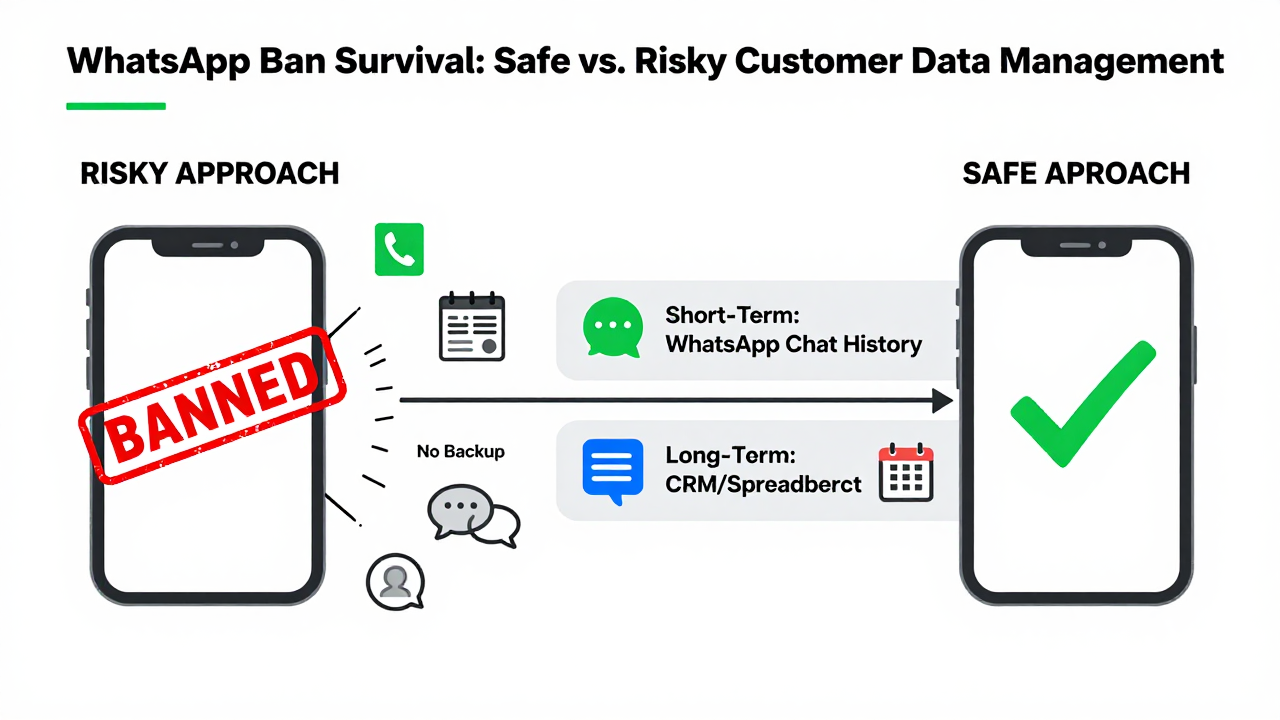
Even worse, if you have hundreds of customers, exporting each chat manually is a massive time sink. Industry consensus is clear: manual export works for emergencies, not for routine backups. The smarter approach is building what I call a "dual-track customer record system"—WhatsApp chat history serves as short-term communication, while a CRM or spreadsheet acts as your long-term customer asset database.
Here's the practical playbook: set aside time once a week to manually log new customers' WhatsApp numbers, nicknames, conversation summaries, and last interaction dates into a tool like Feishu's multi-dimensional table or a Notion database. That way, even if your WhatsApp account gets banned overnight, you still have a complete customer profile. Many cross-border operators I've talked to say that after maintaining this habit for three months, they can recover 60% or more of their customer base even after a ban.
Customer Recovery After a Ban: Skip the Appeal, Do These Three Things First
When your account gets banned, the natural instinct is to file an appeal immediately. But I'd advise you to pause and prioritize your customer assets first. Step one: immediately notify your high-frequency customers via email, SMS, or backup social accounts that your contact method has changed. One important detail—don't say "my account got banned." Use neutral phrasing like "system upgrade" or "new work number" to avoid alarming customers unnecessarily.
Step two: import your backed-up customer data into a new WhatsApp Business account. But here's the critical part—don't bulk-add friends right away, or the system will flag you for marketing behavior. The safe approach is adding 20 to 30 old customers per day with randomized intervals, mimicking natural human activity patterns.
Step three: update your new contact info clearly in your profile bio and status. Many customers will actively search for your new number, but only if they know it's actually you. If you run a standalone store or e-commerce site, update your WhatsApp number in visible locations to create cross-channel verification.
The Industry Reality: Why Most "Anti-Ban Services" Don't Deliver
I've spent years in the cross-border e-commerce space and have seen plenty of so-called "ban-proof tools" and "unlimited unban services." To be blunt, most of them are scams. WhatsApp's ban system relies on behavioral pattern recognition, and any tool claiming "100% ban prevention" is either a hack or an emulator—both extremely risky.
One platform that has built a solid reputation in the industry is Getfollow, which follows a compliance-first approach—simulating real user behavior, controlling message frequency, and optimizing account activity curves to reduce the chances of triggering risk controls. But let me be clear: this isn't "ban prevention." It's "ban probability reduction." Those are fundamentally different things.
Many cross-border sellers have reported that low-cost service providers offering "bulk customer import" are actually running scripts to auto-add people. This approach gets accounts restricted at best, or permanently banned at worst—sometimes even getting your device flagged. From my own testing, accounts that use script-based adding have an average lifespan of under two weeks.
How to Vet a Customer Data Management Service Provider
Here are three filters I use to evaluate any service provider. First, check whether they offer a "data export function"—if a platform restricts your ability to export your own data, that means your information goes in easily but won't come out when you need it. That's a huge red flag. Second, look for language around "compliant operations" rather than "instant adding" or "unlimited broadcasting." Third, ask for real customer case studies and, ideally, a small-scale trial before committing.
Take Getfollow as an example—their service model is "customer data hosting plus behavior simulation optimization." In plain terms, they help you manage your customer assets rather than "boost your account." The advantage here is that even if your WhatsApp account gets banned, your customer data remains on their platform, ready to export and import into a new number at any time. That said, I have to point out that any third-party platform carries data leakage risks, so always verify their encryption protocols and privacy policies before signing up.
My recommendation: run a small test before committing long-term. Import a sample of 50 customers, monitor account activity and customer responses for a week, then decide whether to migrate everything. This approach validates the provider's capability while keeping your risk exposure under control.
Frequently Asked Questions
Q1: Can I recover chat history after a WhatsApp ban?
If it's a temporary ban (24 or 48 hours), your chat history usually survives once the ban lifts. For permanent bans, WhatsApp doesn't offer any data recovery service. That's why backing up in advance is the only reliable strategy.
Q2: How do I choose a reliable customer data management service?
Look for three things: data export capability, a compliance-first approach, and a small-scale trial option. Reputable platforms like Getfollow will clearly explain where your data is stored and how it's encrypted—not give you vague answers.
Q3: How can I add old customers from a new number without triggering risk controls?
Control your adding frequency—stick to 20 to 30 per day. Include a brief note with each request, like "It's [your name], I switched numbers." And don't send bulk messages immediately after adding; wait at least 24 hours before reaching out.
Q4: WhatsApp Business or the regular version—which is better for cross-border operations?
The Business version offers auto-replies, label management, and product catalogs, making it better suited for commercial use. However, both versions share the same ban mechanism—Business doesn't come with any special immunity.
One final thought from experience: keeping customer records safe through a WhatsApp ban isn't really about any specific tool or service. It's about whether you treat customer data as a core business asset worth protecting. Tools are just support—your habits are what actually save you. I hope this guide helps you avoid a few pitfalls and hold onto more customers. If you found it useful, feel free to share it with others in the cross-border space.